Lumen AI Agents

Meet your AI team.

Six specialist agents and one assistant that knows your business — working inside Lumen to draft, record, plan and report, while you stay in charge of every decision that matters.

How it works

You ask. They draft. You decide.

Each agent looks after one part of your business using your real records. Answers are instant; anything that changes your books is a proposal until you say yes.

  1. 01

    Ask

    Type, speak or attach a file — in plain language, the way you’d brief a colleague.

  2. 02

    Plan

    Ask Lumen understands the request and hands each part to the right specialist.

  3. 03

    Review

    The agent prepares the work and shows you exactly what will change.

  4. 04

    Approve

    Sensitive actions wait for your go-ahead. Everything is recorded.

Ask Lumen

One assistant for your whole business.

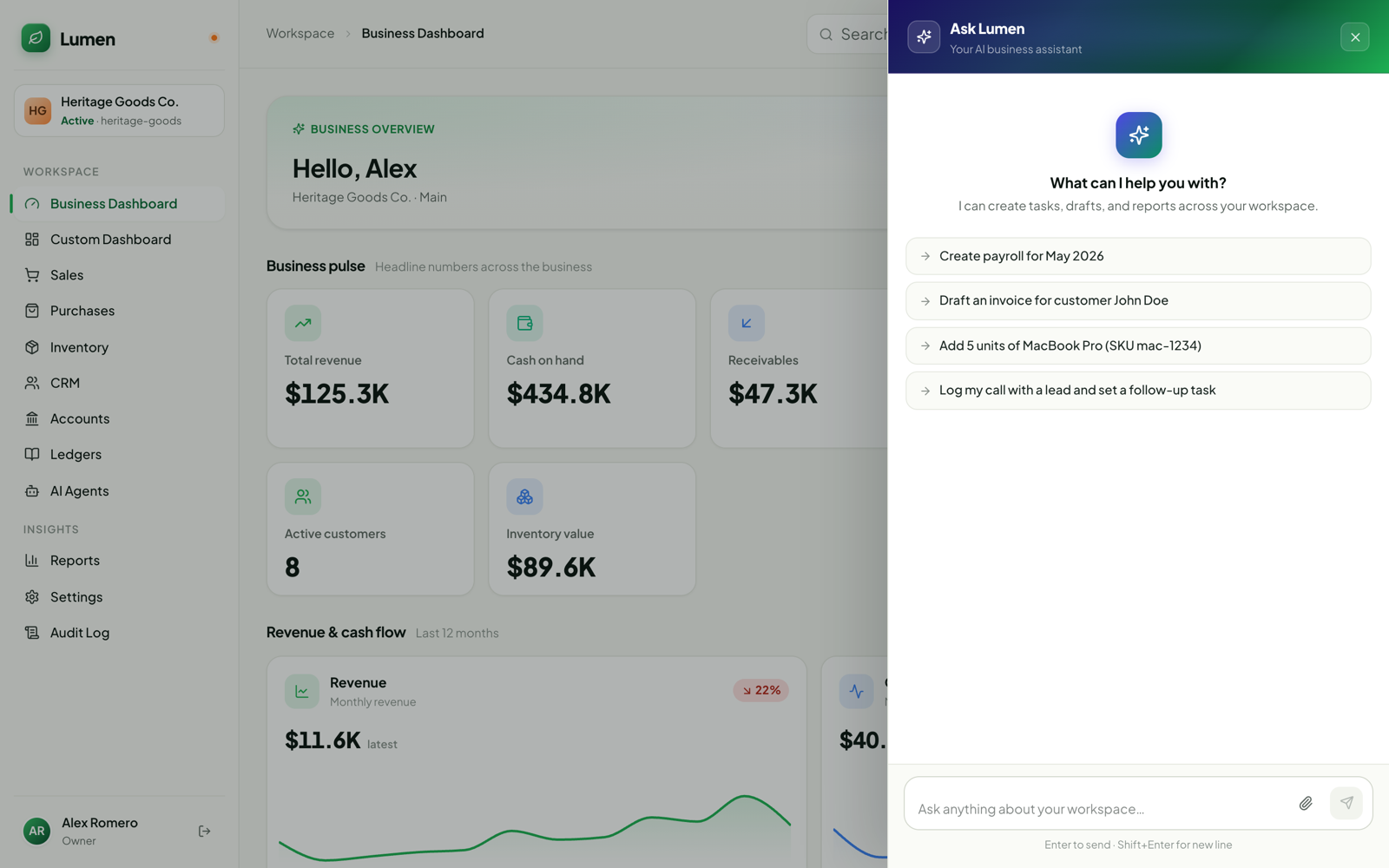
No menus to learn and no need to know which screen does what. Say what you need — Ask Lumen works out which specialist should handle it, hands the work over and keeps you updated with clear plan cards.

Ask from anywhereOne button in the top bar, on every page — desktop and mobile.
Many requests, one messageIt splits a busy message into separate tasks for the right agents.
Attach a file, get it doneDrop in a customer list, spreadsheet, PDF or photo — every record is created for you.
Talk instead of typeSend a voice message and Lumen takes it from there.
Asks before it assumesMissing a detail like currency or payment terms? It asks — it never fills in the blanks for you.
Always know where things standAsk “how’s my payroll task going?” and get an instant status update.
Ask Lumen open over the business dashboard, suggesting actions such as creating payroll, drafting an invoice, adding stock and logging a call
The specialists

Six agents. Every corner of your business.

Each one knows its job — and the rules of your workspace. Here’s what they take off your plate.

Agent 01 of 06

Sales agent

Your revenue & receivables assistant

Quotes, orders, invoices and payments — and a clear read on who owes what.

Spend less time on paperwork and more time selling. The Sales agent prepares the documents, records the money and tells you exactly where every customer stands.

  • Quote to cash in one chatCreate a quotation, turn it into an order, then an invoice — without switching screens.
  • Payments & advancesRecord customer payments and advances against the right invoice, every time.
  • Returns & credit notesHandle returns, refunds and credit notes in a sentence instead of a dozen clicks.
  • Ready to shipPrepare delivery notes and packing lists for orders that are ready to go out.
  • Know who owes whatReceivables aging, customer statements, sales summaries and discount reports on demand.
  • Bulk customer importDrop in a customer list or spreadsheet and every customer is created for you.

Just ask

  • “Draft an invoice for Ali Traders for 20 cartons of green tea”
  • “Who has owed us money for more than 60 days?”
  • “Send Hassan & Co. their statement for this quarter”

You stay in control

Everything starts as a draft. Nothing is issued, sent or posted until you ask — and money matters like recording payments, refunds or voiding an invoice wait for your approval. If two products look alike, it asks rather than guesses.

Where you’ll find itThe Sales agent button on the Sales page · Ask Lumen · Agent Mode

Agent 02 of 06

CRM agent

Your business developer

Works your leads and deals like a rep who owns the pipeline — and always suggests the next step.

Tell it what happened on a call and it does the admin: updates the deal, logs the conversation, sets the follow-up and tells you what to do next.

  • Capture in one lineLog a call, add a lead or move a deal just by describing what happened.
  • Qualify leads your wayQualify, disqualify or reopen leads using your own criteria.
  • Always a next stepReads your updates as buying signals and suggests the follow-up — then schedules it.
  • Search by meaningAsk “who asked about Shopify?” and it finds the conversation, even if those exact words were never used.
  • Pipeline at a glancePipeline health, stage movement and week-over-week progress whenever you ask.
  • Emails that sound like youDrafts personal follow-up emails to your contacts, ready for your review.

Just ask

  • “I just spoke to Sara at Bloom Retail — she wants a demo next Tuesday”
  • “What moved in the pipeline this week compared to last week?”
  • “Draft a follow-up to the leads who went quiet after our proposal”

You stay in control

Every email is shown to you first with an “Approve & send” button — nothing goes out without you. It never makes up email addresses, and deleting any record needs your approval.

Where you’ll find itCRM Assistant panel · “Ask assistant” inside every lead and deal · Ask Lumen · Agent Mode

Agent 03 of 06

Inventory agent

Your stock planner & controller

Forecasts demand, drafts reorders and transfers, and flags anything that looks off in your stock.

Stop guessing what to order. The Inventory agent watches your stock for you, plans ahead and explains every suggestion in plain language.

  • Never run outForecasts demand, spots stockout risk early and drafts reorders grouped by supplier.
  • Snap the supplier invoiceUpload or photograph a supplier invoice — it matches it to the purchase order and receives the goods.
  • Catch what’s offFlags unusual movements, cost changes, expiring batches and dead or excess stock.
  • Balance your locationsSuggests transfers between warehouses so stock sits where it actually sells.
  • Supplier scorecardsSee which suppliers deliver on time, in full and at the agreed price.
  • Daily briefing & alertsA stock briefing at the hour you choose, plus alerts for the rules you set.

Just ask

  • “What do I need to reorder this week?”
  • “Here’s the invoice from Karachi Suppliers — receive it”
  • “Why did the cost of basmati rice go up last month?”

You stay in control

Propose first, act only when asked. Purchase orders, transfers, stock adjustments and goods receipts show you the exact lines before you approve, and stock adjustments are reserved for the business owner. It never receives items it couldn’t match.

Where you’ll find itInventory Assistant panel · “Ask” on any item · Inventory Insights · Supplier scorecards · Ask Lumen · Agent Mode

Agent 04 of 06

Finance agent

Your finance manager & accountant

Keeps both books — records and corrects entries, reconciles, closes periods and explains your numbers.

Clean books without the late nights. The Finance agent records the everyday, handles month-end and answers questions about your numbers in plain language.

  • Bookkeeping by conversationRecord income, expenses, transfers and payments by describing them — or snap a photo of the receipt.
  • Bank statements, sortedUpload a statement as Excel, CSV, PDF or a photo. It matches, removes duplicates and books each line.
  • Calm month-endsReconciliations, accruals, depreciation, recurring entries and period close — with a close checklist.
  • Reports & charts in secondsP&L, balance sheet, cash flow, aging and cash forecast — pin charts to your dashboard or export to Excel.
  • Spot problems earlyFlags unusual entries and possible duplicates before they become costly mistakes.
  • Get paid fasterSends polite payment reminders and a regular finance digest straight to your inbox.

Just ask

  • “How did we do last month compared with the month before?”
  • “Import this bank statement and match it to our records”
  • “Show me a cash forecast for the next 90 days”

You stay in control

Journal entries always start as drafts. Posting, reversing, closing a period, completing a reconciliation or sending reminders all wait for your approval. When you only ask a question, it only reads — and every figure comes straight from your books, never estimated.

Where you’ll find itAgent Mode · Ask Lumen · Bank statement import · Finance digest in your Inbox

Agent 05 of 06

Projects agent

Your delivery lead

Keeps projects, tasks, milestones and time on track — and tells you what is slipping.

Get a straight answer on how every project is really doing, and turn meetings into action without anyone retyping notes.

  • Honest project summariesAsk how a project is going and get progress, milestones and what’s at risk in one view.
  • Tasks & milestonesCreate and update tasks and milestones just by asking.
  • Standup to actionPaste or speak your standup notes and it turns them into a project update plus tasks.
  • Time loggingLog time against a task in a single sentence.
  • Client proposalsFind, create and send proposals to clients from the same conversation.
  • Clear about blockersPoints out what’s blocking a task instead of forcing it to “done”.

Just ask

  • “What’s slipping on the Gulberg showroom project?”
  • “Here are the notes from today’s standup …”
  • “Log 3 hours on the homepage design task”

You stay in control

It suggests tasks before creating them unless you ask it to go ahead, and sending a proposal to a client always waits for your approval.

Where you’ll find itAsk Lumen · Agent Mode

Agent 06 of 06

HR & Payroll agent

Your people operations partner

Employees, payroll, onboarding and offboarding — new hires sent their paperwork in one line.

Look after your people without the paperwork pile-up. Payroll, attendance and new-joiner onboarding all happen in a sentence.

  • Payroll in a sentence“Create payroll for May” — it prepares the run, processes it and records the payment.
  • Attendance in bulk“Everyone in sales was on leave on Friday” — marked in one go.
  • Welcome new hiresStarts onboarding and sends a secure, PIN-protected welcome link — plus a ready-to-share WhatsApp invite.
  • Signatures, chased for youSend contracts and policies for e-signature, then ask “who hasn’t signed yet?”
  • Records & salary structuresAdd employees, set up salary structures and keep records up to date.
  • Design HR journeysDescribe a process and it drafts the onboarding or offboarding flow for you.

Just ask

  • “Create payroll for May 2026”
  • “Onboard Ayesha Khan as a sales executive starting Monday”
  • “Who hasn’t signed the new leave policy yet?”

You stay in control

Running and paying payroll, starting onboarding or offboarding and sending documents for signature all need approval. Missing details are requested in one go, and secure PINs are only ever shown to the person who asked.

Where you’ll find itAsk Lumen · Agent Mode · Agent Board

AI in everyday work

Smart help, built into the screens you already use.

Beyond the agents, Lumen AI shows up exactly where the work happens — writing first drafts, reading paperwork and finding what you’re looking for.

Proposals written for you

Give a short brief — client, scope, price and timeline — pick a tone and add reference documents. Lumen writes a complete proposal with a pricing table or package options. Not quite right? Generate another. Sending is always your call.

HR flows built from a sentence

Describe the onboarding or offboarding you want and get a complete flow: forms, uploads, team tasks, due dates and signatures on your own templates. Refine it with one-click undo; nothing is saved until you choose.

Speak in your own language

Record a voice message of up to three minutes. Speak English, Urdu or Hindi — Urdu and Hindi are written out in Roman Urdu so everyone on the team can read them.

Reads your documents

Receipts, supplier invoices, bank statements and even scanned PDFs — upload or photograph them and Lumen reads the details for you.

Search by meaning

Find customers and conversations by what they were about, not just the exact words. “Who asked about delivery to Lahore?” finds it.

Charts you can keep

Ask for a chart in conversation and pin it straight to your dashboard, or export the numbers to Excel in one click.

Your command centre

See every agent. Approve in one click.

Agent ModeA full-page workspace for working with any agent
  • All your agents in one place. Pick an agent and pick up right where you left off.
  • Know who needs you. Green means an agent is working; amber means it’s waiting on you.
  • Approve with the full picture. Approval cards show the exact email, order lines or figures first.
  • Stop, retry, continue. Stop a task at any time, or try again in one click.
  • Files, photos and voice. Attach up to five files, paste images or record a voice note.
  • Made for mobile too. A dedicated phone layout for running your business on the go.
Agent BoardA live view of every AI task in your workspace
  • One column per agent. See at a glance what each specialist is working on.
  • Approvals come first. Tasks waiting for a decision are flagged and sorted to the top.
  • Approve or reject in one click — with the original request and the proposed change side by side.
  • Right people, right decisions. Only team members you trust with approvals can approve.
  • Retry or cancel any task from the same drawer.
Inventory agentNeeds your approval
Waiting on you

Create 2 purchase orders for low-stock items

Karachi SuppliersBasmati rice 25kg × 40
Punjab PackagingCartons, large × 500

Bring your own AI tools

Already use an AI assistant such as Claude? Connect it securely to your Lumen projects with time-limited, permission-scoped access. It reads the project, posts a plan for your team to approve, and only then gets to work — keeping tasks updated as it goes. It never marks work as done on its own.

Built on trust

Answers are instant. Actions are proposals.

Lumen AI will never post an entry you didn’t see. AI takes the busywork off your plate; the decisions stay with you. Read why →

You approve what matters

Payments, payroll, posting to the books, sending emails and deleting records all wait for a person to approve.

Works within your permissions

An agent can only see and do what the person asking is allowed to — your roles and access rules always apply.

Real numbers, never guesses

Every figure comes straight from your records. The AI explains your numbers; it doesn’t invent them.

Asks instead of assuming

When something is unclear or missing, the agent asks one clear question rather than guessing.

A full audit trail

Every AI action is recorded in your Audit Log and clearly marked as done by AI.

Clear, simple usage

AI credits with a full usage log, so you always know what was used — and a task already under way is never cut off halfway.

Put your AI team to work.

Try Lumen and all six AI agents free for 3 days. No credit card required.

Want a walkthrough? WhatsApp +1 603-999-7348 · Download the PDF guide